
Samsung Decimal Numeric Keyboard - Fix for Xamarin.Forms (Android)
"Fix Samsung keyboard decimal input issue in Xamarin.Forms! Custom renderer handles comma/period for numeric input on Android. #XamarinForms #Android"
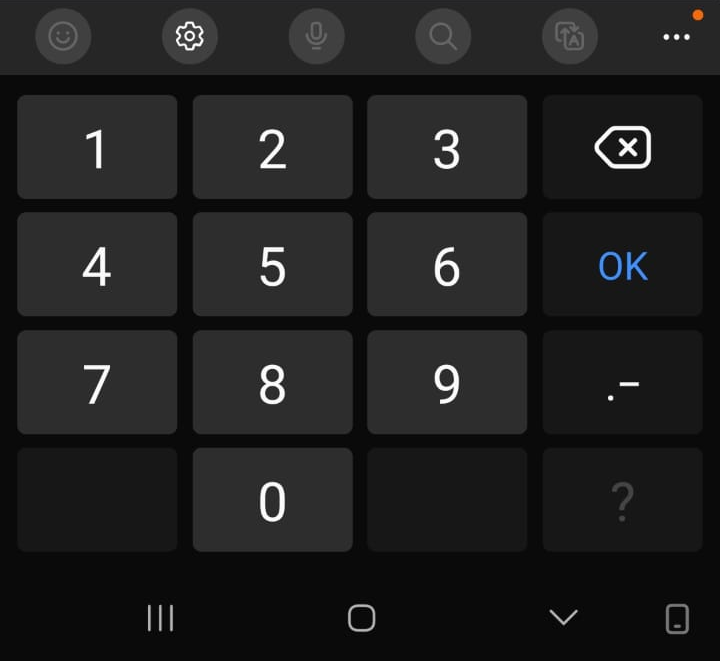
The Samsung Keyboard Challenge in Xamarin.Forms
When developing cross-platform mobile applications with Xamarin.Forms, developers encounter a specific issue with Samsung devices: the numeric keyboard doesn't display or accept the decimal separator key (comma in Brazilian Portuguese, German, and other regions). This creates a significant usability problem as users in these regions:
Cannot see the comma (,) on the numeric keyboard
Cannot input decimals by typing a period (.) as it's not accepted
Are effectively blocked from entering any decimal numbers
This issue specifically affects:
Samsung's default keyboard in numeric mode
Regions where comma is the standard decimal separator
Applications requiring decimal input (financial, scientific, measurement tools)
🛑 Danger
❗ Important Context: While Xamarin.Forms reached end-of-life in May 2024, numerous enterprise applications remain in maintenance mode. This solution provides stability for teams planning their MAUI migration. If you've tested this behavior in MAUI, please share your findings in the comments below.
The Solution
This custom renderer solves this by:
Detecting Samsung devices
Handling both comma and period inputs
Converting the inputs to match the current culture's decimal separator
Ensuring users can enter decimal numbers regardless of keyboard limitations
The fix is particularly important for applications targeting Brazilian and German markets, where decimal input is essential and the comma is the standard separator.
Reference: GitHub Issue #6579 - Numeric keyboard decimal separator problem on Samsung devices
Technical Implementation
1. PreRequisits
Before implementing the solution, ensure your project meets these requirements:
✅ Xamarin.Forms version 4.0 or higher ✅ Android target framework 10.0+
2. Usage in XAML
<Entry keyboard="Numeric" placeholdertext="Enter decimal value" x:name="decimalEntry">`
3. Custom Renderer Implementation
Grab the custom renderer from GitHub. Samsung Keyboard Decimal Fix for Xamarin.Forms (Android)
That's it!
4. In conclusion
You've now fixed the Samsung keyboard numeric decimal issue in your Xamarin.Forms (Android) app. I encourage you to test this solution thoroughly and leave a comment below if you have any questions or feedback.
Share your experiences, ask questions, and help others who might be facing the same challenge. Happy coding! =)